

A retirement income calculator Ireland estimate can look reassuring, but depend on assumptions that don’t match your plans. A calculator can help you explore whether your pension savings and State Pension may support the lifestyle you want. Its result is a guide, not a promise: contributions, investment growth, inflation and charges can all affect the projection.
To get a meaningful estimate, you’ll need details such as your current pension value, regular contributions and intended retirement age. This guide explains what to enter, how to interpret the assumptions behind your result and what to review if it falls short of your goal. It also covers practical next steps for putting a projection in the context of a wider retirement plan.
Key Takeaways
- Use a retirement income calculator as a starting estimate, not a promise of future income.
- Gather current pension statements and contribution details before entering figures, then review the calculator’s assumptions.
- Compare projections only after checking whether the tools treat contributions, investment growth and the State Pension in the same way.
- If an estimate falls short, check your inputs first, then consider whether contributions, retirement timing or existing pension arrangements need review.
- Personalised retirement planning can put your estimate in context and help you explore options such as PRSAs, Annuities and ARFs.
Retirement income calculator Ireland: what to check in your estimate
Before acting on a projection, identify what it includes and what assumptions it uses. In particular, check whether the result includes the State Pension, whether it is shown before or after charges or tax, and how the calculator treats inflation and investment growth. These details help you interpret the figure and compare it fairly with another estimate.
What a retirement income calculator can tell you about your future
A retirement income calculator turns details about your pension savings and plans into an estimate of possible future income. It can help you explore how different choices might affect your finances, but it only works with the information and assumptions entered. The result is an illustration, not a promise or personalised recommendation.
A calculator estimates what your pension savings may provide under stated assumptions; it doesn’t guarantee the income you’ll receive. An estimate can help you identify questions and compare scenarios. By contrast, an Annuity is designed to pay an income according to its terms. For example, it can provide a guaranteed income for life in exchange for pension capital, subject to the terms selected.
What information does a retirement income calculator estimate?
Your age and intended retirement timing help determine how long your pension savings may have to grow and when you expect to draw on them. A calculator may also ask for the value of your existing pension savings, your regular contributions and, in some cases, your desired retirement income.
Keep three figures distinct: your pension pot is the savings built up in a pension; your regular contributions are the amounts paid in over time; and your annual retirement income is the income you may receive each year. A target is what you hope to have available, while a projection estimates what your savings could support. Don’t treat an income target entered into a calculator as an amount it has forecast.
Why calculator results are starting points, not promises
A projection depends on assumptions about factors such as investment performance and what may happen between now and retirement. Actual returns can differ from an illustration, and changes to your circumstances or plans can affect the result. Calculators may also handle income sources differently.
Some tools combine pension savings with the State Pension or other income sources; others show only the amount linked to your pension pot. Check what the result includes before deciding whether it looks sufficient. A figure that excludes an income source isn’t directly comparable with one that includes it.
Before relying on a result, note the assumptions displayed, including the projected growth rate, any inflation adjustment and whether the figure is shown before or after charges or tax. If a detail isn’t explained, don’t assume it has been accounted for. Use the estimate as a starting point for wider retirement planning, where different income sources and personal circumstances can be considered together.
How to use a retirement income calculator: prepare your details and run scenarios
Prepare your pension information before using a calculator. Then create a baseline estimate and test realistic changes separately. This makes it easier to see which factors influence the result and reduces the risk of relying on guessed or outdated figures.
Gather the details before you begin
Have your current age, intended retirement timing and pension values to hand. Recent pension statements can help you enter up-to-date balances. If you have more than one pension, note each value and check whether the calculator lets you enter them separately or asks for a combined figure.
Write down your regular contributions too. Your own contributions are the amounts you pay in; employer contributions are amounts paid in by your employer, where applicable. Use the figures that apply to you, and check whether the calculator asks for weekly, monthly or annual amounts. Keep current details separate from assumptions about future growth, salary or contributions.
Run a baseline and compare realistic scenarios
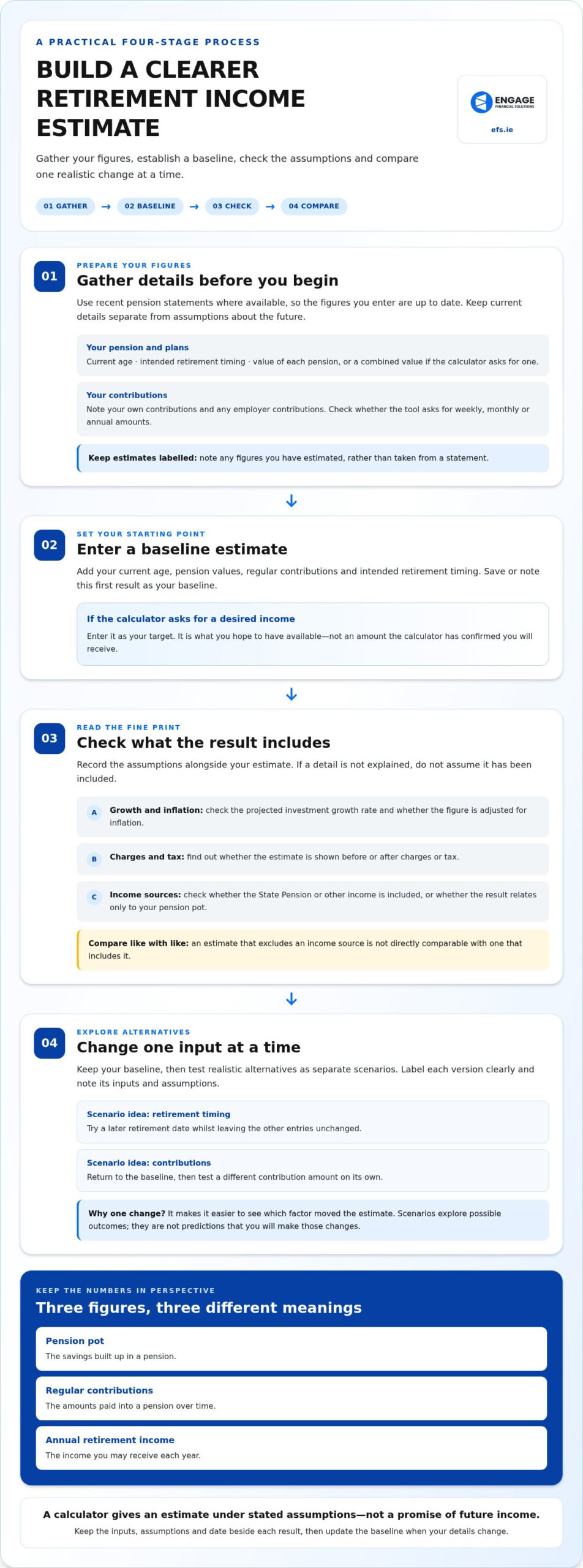
Follow this sequence to keep your estimates organised:
- Gather your information. Use pension statements and contribution records where available, and note any figures you’ve estimated.
- Enter a baseline. Add your current age, pension values, regular contributions and intended retirement timing. If asked for a desired income, enter it as your target, not as an amount the calculator has confirmed you’ll receive.
- Review the assumptions. Check how the tool treats investment growth, inflation, charges, tax and other income sources. Record the assumptions alongside the result.
- Test alternatives. Save the baseline, then try a later retirement date or a different contribution pattern as separate scenarios. Label each version clearly.
Tip: Change one input at a time to see what affects the estimate. If you change several together, it’s harder to tell why the result moved.
For example, test a later retirement date while leaving the other entries unchanged. Return to the baseline, then test a different contribution amount. These scenarios aren’t predictions that you’ll make either change; they’re a way to explore possible outcomes and consider what might be realistic for you.
Save or note the date, inputs and assumptions for each run. When you revisit the calculator, update the baseline with current figures rather than relying on an old estimate. Keeping the details beside each result makes it easier to understand changes over time. For a broader view of how pension savings fit into your longer-term plans, see this retirement planning guide.
How to compare retirement income calculator results and income options
Two calculators can produce different projections from similar-looking details. Before deciding that one is more accurate, compare their inputs, assumptions and included income sources. The difference may come from the figures entered or from how each calculator works.
Which assumptions should you compare between calculators?
Record the intended retirement date, contribution amounts, investment assumptions and income target for each result. Then check whether the State Pension is included and how the calculator says it is treated. Don’t assume a projection includes it just because the tool is designed for retirement planning.
Use a table like this to organise your comparison. Write “not stated” when a calculator doesn’t explain an item. That’s a reason to treat the result cautiously, not to fill the gap with a guess.
| What to compare | What to record |
|---|---|
| Inputs | Retirement date, current pension savings, contributions and income target |
| Assumptions | Investment growth, inflation, charges and any other assumptions shown |
| Projected income | Whether the figure is annual or more frequent, and what savings it relates to |
| State Pension | Whether it is included and how the calculator says it is treated |
| Limitations | Warnings or details the calculator says are excluded or uncertain |
Compare figures directly only when the inputs and assumptions are sufficiently alike. If one projection uses a different retirement date, assumes different growth or includes the State Pension while another doesn’t, they aren’t measuring the same scenario. Treat unclear or missing details as a prompt to investigate, not as proof that the calculators contradict each other.
How can Annuities and ARFs fit into income planning?
Calculator projections can help you explore your overall position, but they don’t decide how your pension savings should provide income. An Annuity and an Approved Retirement Fund (ARF) work differently. An Annuity exchanges pension capital for a guaranteed income for life, according to its terms. An ARF keeps money invested after retirement, with withdrawals managed from the fund and investment risk remaining with you.
Neither option is automatically right for everyone. Your circumstances, income needs and preferences matter, so consider these options as part of a wider retirement plan rather than choosing from a projected figure alone. You can read more about Approved Retirement Fund guidance as you learn about this option.
Use each calculator result as an illustration, not a guaranteed payment or a personalised financial recommendation. A tailored review can put the figures alongside your pension arrangements and other income sources, then explore whether Annuities or ARFs fit your plans.
What to do if your retirement income misses your target
A projection below your desired income can feel unsettling, but it isn’t a verdict on your future. First, check what the calculator used and what it left out. A shortfall is a prompt to review your assumptions and options, not to make a rushed decision.
Review the estimate before changing your plans
Check that the pension values, regular contributions and intended retirement timing match your current information. An outdated balance or a missed employer contribution can affect the result. Then review the assumptions: are future growth, inflation or charges included, and is the projection shown before or after tax?
Check whether the calculator includes the State Pension or other expected income. If it doesn’t, the displayed figure may not represent your full retirement income. Don’t add an income source automatically if the calculator’s method or your eligibility hasn’t been established. Separate factors you can explore, such as a different contribution amount, from uncertain future outcomes such as investment performance.
Consider your target in the context of your household. Your planned lifestyle, regular commitments and whether you expect to share costs with a partner can all shape the income you may need. Focus on the life you want to fund rather than reacting to a figure in isolation.
Turn the estimate into a manageable review plan
Keep your baseline and alternative scenarios together, with inputs and assumptions recorded beside each result. This makes it easier to see what changed and gives you a clearer starting point for a planning discussion. Work through one practical question at a time:
- Contributions: Would a change to your personal or employer contributions be realistic within your current budget?
- Retirement timing: What would a later retirement date mean for your plans and projected income?
- Existing arrangements: Have you included all relevant pension savings and checked how they may contribute to your future income?
- Income target: Does the figure reflect your expected household needs and intended lifestyle?
These are factors to examine, not automatic instructions to increase contributions or delay retirement. Any change still needs to fit your circumstances and wider financial plans. If the figures leave you unsure, personalised retirement planning can help put the estimate, your existing arrangements and your goals into context.
For a considered review of how different income options may fit your plans, explore Annuity planning guidance.
How personalised retirement planning can build on your calculator estimate
A calculator can help you explore possibilities, but it can’t bring every part of your financial life together. Personalised retirement planning with Engage Financial Solutions can put your estimate alongside your current pension arrangements, intended retirement timing and the lifestyle you hope to support. The aim is to understand what the figures may mean for you, not to promise a particular income or outcome.
What can a tailored retirement review bring together?
A review can examine the details behind your projection: which pension savings it includes, what contribution pattern it assumes and whether the retirement date reflects your plans. It can also help you consider how your different arrangements relate to your goals, rather than viewing each pension in isolation.
Depending on your circumstances, a discussion may cover PRSAs, Company Pensions, Personal Pensions, Annuities and ARFs. These arrangements can play different roles in retirement planning. The useful question is how each option fits your needs, preferences and wider financial picture. Clear explanations can help you understand what to consider and identify practical next steps, without treating a calculator result as a recommendation or guaranteed outcome.
Prepare for a useful retirement planning conversation
A few notes can help keep the discussion focused on the questions that matter. Bring your calculator results and the assumptions shown, alongside current pension statements and contribution details where available. If you’ve run more than one scenario, keep the inputs with each result so you can explain what you changed and why.
Write down your desired retirement timing and income goals beforehand. Note any assumptions you’re uncertain about, such as whether a figure includes all your pension arrangements or how a particular income option might work. You don’t need every answer ready. A clear list of questions can help turn an estimate into a focused discussion.
- Gather: your pension statements, contribution information and calculator outputs.
- Clarify: which assumptions or income sources you’d like to understand better.
- Prioritise: the decisions you want to explore first, such as retirement timing or how existing arrangements fit together.
This preparation helps keep the discussion grounded in your circumstances, whether you’re reviewing plans well ahead of retirement or considering choices closer to the time. For support in relating your estimates to your wider plans, explore retirement planning guidance.
Give your retirement plans a clear next step
Use your estimate to choose one question to explore next, such as how your plans might change if you retire earlier or later, or how much flexibility you want in your income. A calculator can support that thinking, but your choices should reflect your priorities and circumstances.
Engage Financial Solutions provides personalised financial guidance, including retirement planning that can consider pensions, PRSAs, Annuities and ARFs. A tailored conversation can help you make sense of your options and identify practical steps without promising a particular result.
Explore personalised retirement planning with Engage Financial Solutions and take a considered step towards the future you want. The team can help you put your estimate in context and plan your next steps.
Frequently Asked Questions
Is a retirement income calculator accurate?
It can calculate an estimate from the details and assumptions entered, but it can’t predict future investment performance or changes in your circumstances. Accuracy also depends on the quality of your inputs. An old pension balance or a contribution entered at the wrong frequency may skew the projection. Check figures against recent statements and treat the result as a planning aid, not a precise forecast.
Can a retirement income calculator include the State Pension?
Some calculators let you include the State Pension, while others focus on private pension savings. Look for a clear note explaining whether it’s counted and what information the figure relies on. If you’re unsure, run the estimate without it first, then consider it separately using current official information about your circumstances. This helps prevent an assumed payment from being mistaken for an amount you’re certain to receive.
How much income should I plan for in retirement?
There’s no single income target that suits everyone. Start by sketching a retirement budget: separate essential costs, such as household bills and food, from spending you could adjust, such as travel or hobbies. Consider whether housing costs or other regular commitments may change. A retirement income calculator can help you compare a target with projected resources, but your budget should reflect your household and priorities.
What happens if my projected retirement income is lower than expected?
First, check that the result reflects your current pension arrangements and the income sources you intended to include. Then choose one factor to explore, such as a different contribution amount or retirement date, and note how the estimate changes. Avoid making a decision based on a single run. If the gap remains a concern, a personalised review can help you consider your options in light of your circumstances.
Can I use a retirement income calculator if I am self-employed?
Yes, if the calculator accepts details that match your pension savings and contributions. Use current statements for existing pension values, and enter contributions in the format requested. If your payments vary, don’t present an irregular amount as a fixed commitment. Record what you’ve contributed and test a separate, realistic future contribution scenario. This can make the projection more useful without implying your income or payments will stay the same.
How often should I update my retirement income estimate?
Review it when you have updated pension information and after a change that could affect your plans, such as a new job, a shift in contributions or a revised retirement date. You could also set a regular reminder, perhaps as part of an annual financial check-in. Keep each dated result with its inputs so you can distinguish changes in your plans from differences caused by updated assumptions.
Does a calculator tell me whether an Annuity or ARF is right for me?
No. A calculator may show a projected figure, but it can’t weigh up your personal priorities or recommend which structure suits you. An Annuity and an ARF involve different approaches to retirement income, and the right discussion depends on your needs and circumstances. Use the projection to prepare questions about income certainty, flexibility and how each option fits with your wider plans, then seek personalised guidance before deciding.
Disclaimer
Engage Financial Services LTD T/A Engage Financial Solutions is regulated by the Central Bank of Ireland CRO 764570. Suite 2 First Floor, 14 -18 Main street, Blackrock, Co Dublin. A94 W0Y3